> ## Documentation Index
> Fetch the complete documentation index at: https://docs.istari.ai/llms.txt
> Use this file to discover all available pages before exploring further.
# Advanced search filters
Whichever of the [three search methods](/goi/dashboard#three-ways-to-search) you use, you can refine the results with **keyword refinement filters**. These filters sit on top of your main query and are accessed from the **Other Filters** button below the search bar, on the **Keywords** tab.
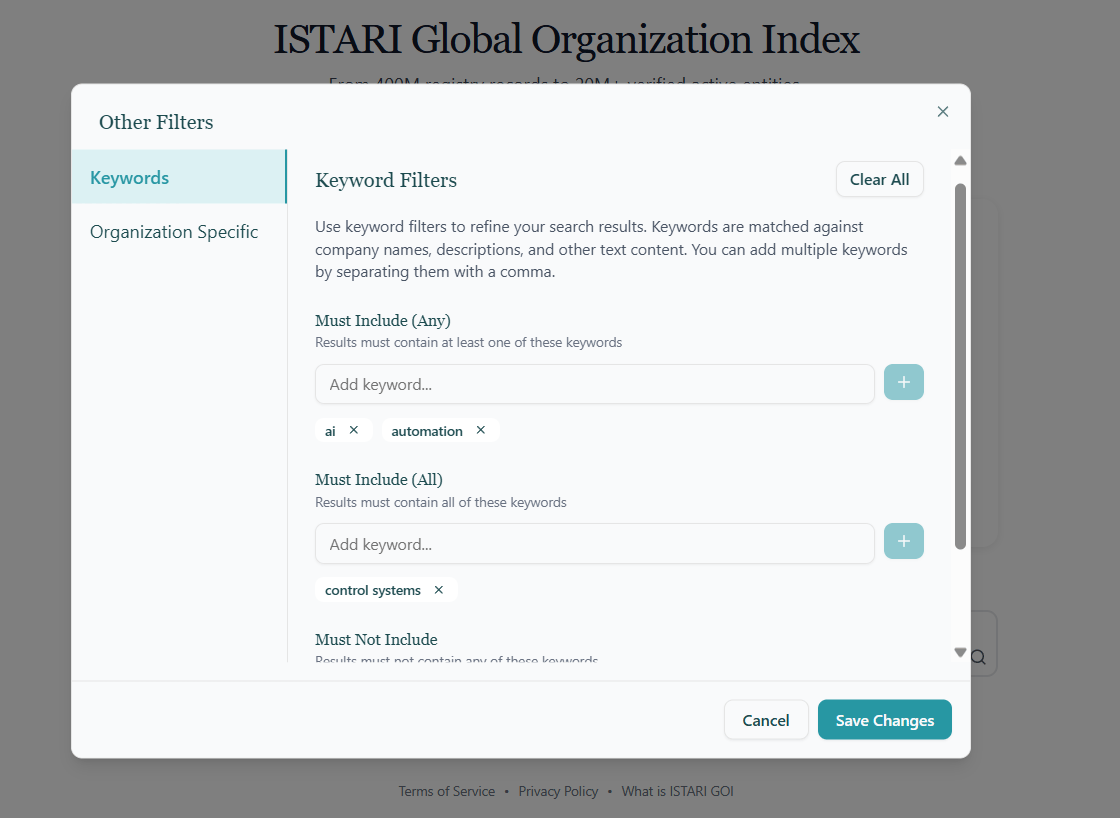 ## Keyword filters
On the **Keywords** tab of the Other Filters dialog you can build three separate keyword lists:
* **Must Include (Any):** At least one of the listed keywords must appear in an organization's profile.
* **Must Include (All):** All listed keywords must appear.
* **Must Not Include:** Organizations mentioning these keywords are filtered out.
Use this to fine-tune thematic relevance or exclude irrelevant segments. For example, a semantic query for *"automotive interior suppliers"* combined with a *Must Not Include* of *recycling* narrows the results to organizations that do **not** advertise recycling activities.
**Keyword filters vs. Keyword Search.** Keyword filters are a *refinement layer*: they apply on top of any search method. [Keyword Search](/goi/keyword-search), on the other hand, is a standalone search method you pick from the search-type dropdown, where keywords are the main query rather than a filter.
## Related filters
The **Other Filters** dialog also has an **Organization Specific** tab covering [organization size, type, and NACE code](/goi/organizational-filters). For geographic narrowing, use the separate [Location Filters](/goi/location-filters) button.
## Keyword filters
On the **Keywords** tab of the Other Filters dialog you can build three separate keyword lists:
* **Must Include (Any):** At least one of the listed keywords must appear in an organization's profile.
* **Must Include (All):** All listed keywords must appear.
* **Must Not Include:** Organizations mentioning these keywords are filtered out.
Use this to fine-tune thematic relevance or exclude irrelevant segments. For example, a semantic query for *"automotive interior suppliers"* combined with a *Must Not Include* of *recycling* narrows the results to organizations that do **not** advertise recycling activities.
**Keyword filters vs. Keyword Search.** Keyword filters are a *refinement layer*: they apply on top of any search method. [Keyword Search](/goi/keyword-search), on the other hand, is a standalone search method you pick from the search-type dropdown, where keywords are the main query rather than a filter.
## Related filters
The **Other Filters** dialog also has an **Organization Specific** tab covering [organization size, type, and NACE code](/goi/organizational-filters). For geographic narrowing, use the separate [Location Filters](/goi/location-filters) button.