Whichever of the three search methods you use, you can refine the results with keyword refinement filters. These filters sit on top of your main query and are accessed from the Other Filters button below the search bar, on the Keywords tab.
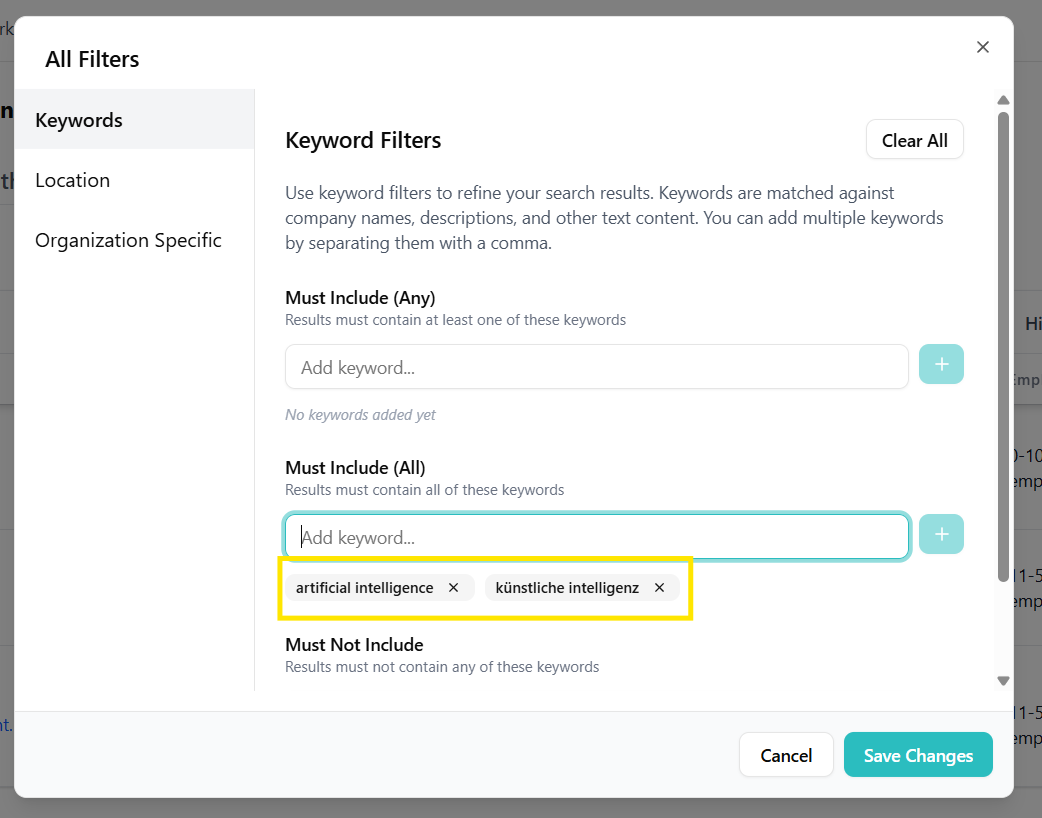
Keyword filters
On the Keywords tab of the Other Filters dialog you can build three separate keyword lists:
- Must Include (Any): At least one of the listed keywords must appear in an organization's profile.
- Must Include (All): All listed keywords must appear.
- Must Not Include: Organizations mentioning these keywords are filtered out.
Use this to fine-tune thematic relevance or exclude irrelevant segments. For example, a semantic query for "automotive interior suppliers" combined with a Must Not Include of recycling narrows the results to companies that do not advertise recycling activities.
Keyword filters vs. Keyword Search. Keyword filters are a refinement layer — they apply on top of any search method. Keyword Search, on the other hand, is a standalone search method you pick from the search-type dropdown, where keywords are the main query rather than a filter.
Related filters
The Other Filters dialog also has an Organization Specific tab covering organization size, type, and NACE code. For geographic narrowing, use the separate Location Filters button.