> ## Documentation Index
> Fetch the complete documentation index at: https://docs.istari.ai/llms.txt
> Use this file to discover all available pages before exploring further.
# GOI Home page
> Discover the GOI Home page and find your way around.
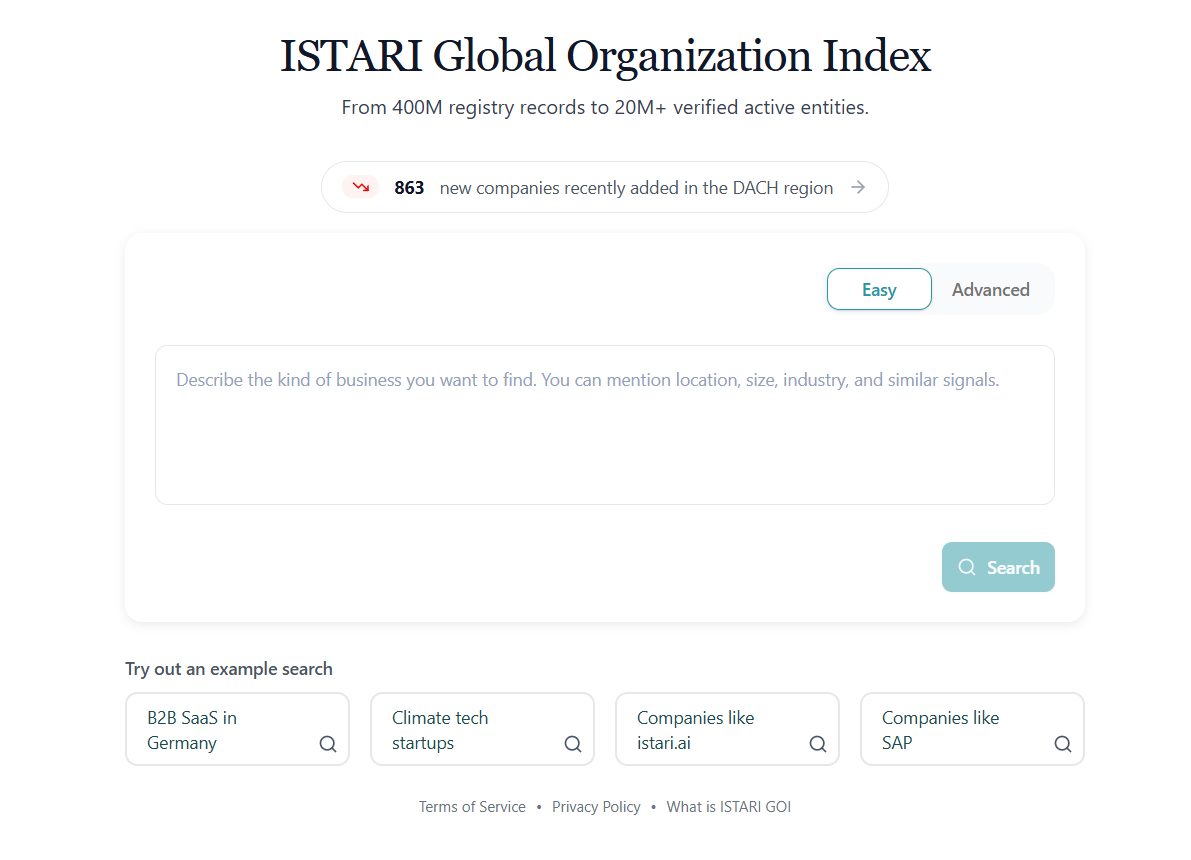
When you first log in to the ISTARI Global Organization Index, you land on the **GOI Home page**: the central hub for searching, exploring, and organising the organizations you care about.
 ## What you see on the home screen
* **Search panel (centre):** where you enter queries to begin discovering organizations.
* **New organizations pill (above the search panel):** shows how many organizations have been newly registered in the DACH region today. Click it to open the [New organizations](/goi/new-companies) page.
* **Example searches (below the search panel):** ready-made queries you can click to try out the search.
## Sidebar (left)
The vertical sidebar gives you fast access to your work in GOI:
* **New search** (blue button): return to the search panel and start a fresh query.
* **Home**: also returns you to the search panel.
* **Lists**: open your saved [Lists](/goi/lists) of organizations.
* **Saved Searches**: open your [Saved Searches](/goi/saved-searches).
At the bottom of the sidebar you'll find:
* The **help menu** (question-mark icon). See the [Help Section](/goi/help-section) for what's inside.
* Your **profile avatar**. Click it to open your account dropdown: see below.
* If you have credit-based features, your **credits balance** is displayed under the avatar. Click the number to open **Subscription and Billing**.
## Profile dropdown
Clicking your avatar at the bottom-left opens a dropdown showing your name, email, and tier. From here you can:
* **Manage Account**: open your user profile to change name, password, etc.
* **API Keys**: open the [API Keys](/goi/api-keys) page (only shown if your account has API access).
* **Subscription and Billing**: track credits, invoices, and transactions (only shown if your account has billing).
* **Manage Organization**: manage your organization's members and settings (only shown if you're part of an organization).
* **Sign out**: end your session.
## Easy mode vs. Advanced mode
The search panel has a toggle in the top-right between two ways of searching:
* **Easy mode**: describe what you are looking for in a single sentence and let ISTARI's AI agent interpret it. The agent picks the right search method (see below), fills in any filters (location, size, industry), and runs the query for you. Best if you're not sure which search method fits.
* **Advanced mode**: you pick the search method yourself and configure filters manually. Best when you want precise control or know exactly how you want to query.
## Three ways to search
In Advanced mode, the search panel has a dropdown that lets you pick between three distinct search methods. Each is suited to a different starting point:
| Search method | When to use it | Page |
| -------------------------- | ------------------------------------------------------------------------------------------------------------------------------ | ------------------------------------------- |
| **Describe organizations** | You have a market description or idea in your head but no specific organization or keywords. Natural-language semantic search. | [Semantic Search](/goi/semantic-search) |
| **Use a similar website** | You know a reference organization and want to find others like it. | [Similarity Search](/goi/similarity-search) |
| **Use keywords** | You want exact term matching with full control over which words define a hit. | [Keyword Search](/goi/keyword-search) |
All three methods can be combined with [Location Filters](/goi/location-filters), [Organizational Filters](/goi/organizational-filters), and [keyword refinement filters](/goi/advanced-search-filters) to narrow results further. In Easy mode you don't pick the method, the agent does, but the same filter system is available.
## What you see on the home screen
* **Search panel (centre):** where you enter queries to begin discovering organizations.
* **New organizations pill (above the search panel):** shows how many organizations have been newly registered in the DACH region today. Click it to open the [New organizations](/goi/new-companies) page.
* **Example searches (below the search panel):** ready-made queries you can click to try out the search.
## Sidebar (left)
The vertical sidebar gives you fast access to your work in GOI:
* **New search** (blue button): return to the search panel and start a fresh query.
* **Home**: also returns you to the search panel.
* **Lists**: open your saved [Lists](/goi/lists) of organizations.
* **Saved Searches**: open your [Saved Searches](/goi/saved-searches).
At the bottom of the sidebar you'll find:
* The **help menu** (question-mark icon). See the [Help Section](/goi/help-section) for what's inside.
* Your **profile avatar**. Click it to open your account dropdown: see below.
* If you have credit-based features, your **credits balance** is displayed under the avatar. Click the number to open **Subscription and Billing**.
## Profile dropdown
Clicking your avatar at the bottom-left opens a dropdown showing your name, email, and tier. From here you can:
* **Manage Account**: open your user profile to change name, password, etc.
* **API Keys**: open the [API Keys](/goi/api-keys) page (only shown if your account has API access).
* **Subscription and Billing**: track credits, invoices, and transactions (only shown if your account has billing).
* **Manage Organization**: manage your organization's members and settings (only shown if you're part of an organization).
* **Sign out**: end your session.
## Easy mode vs. Advanced mode
The search panel has a toggle in the top-right between two ways of searching:
* **Easy mode**: describe what you are looking for in a single sentence and let ISTARI's AI agent interpret it. The agent picks the right search method (see below), fills in any filters (location, size, industry), and runs the query for you. Best if you're not sure which search method fits.
* **Advanced mode**: you pick the search method yourself and configure filters manually. Best when you want precise control or know exactly how you want to query.
## Three ways to search
In Advanced mode, the search panel has a dropdown that lets you pick between three distinct search methods. Each is suited to a different starting point:
| Search method | When to use it | Page |
| -------------------------- | ------------------------------------------------------------------------------------------------------------------------------ | ------------------------------------------- |
| **Describe organizations** | You have a market description or idea in your head but no specific organization or keywords. Natural-language semantic search. | [Semantic Search](/goi/semantic-search) |
| **Use a similar website** | You know a reference organization and want to find others like it. | [Similarity Search](/goi/similarity-search) |
| **Use keywords** | You want exact term matching with full control over which words define a hit. | [Keyword Search](/goi/keyword-search) |
All three methods can be combined with [Location Filters](/goi/location-filters), [Organizational Filters](/goi/organizational-filters), and [keyword refinement filters](/goi/advanced-search-filters) to narrow results further. In Easy mode you don't pick the method, the agent does, but the same filter system is available.