> ## Documentation Index
> Fetch the complete documentation index at: https://docs.istari.ai/llms.txt
> Use this file to discover all available pages before exploring further.
# New organizations
> Browse newly registered organizations across the DACH region.
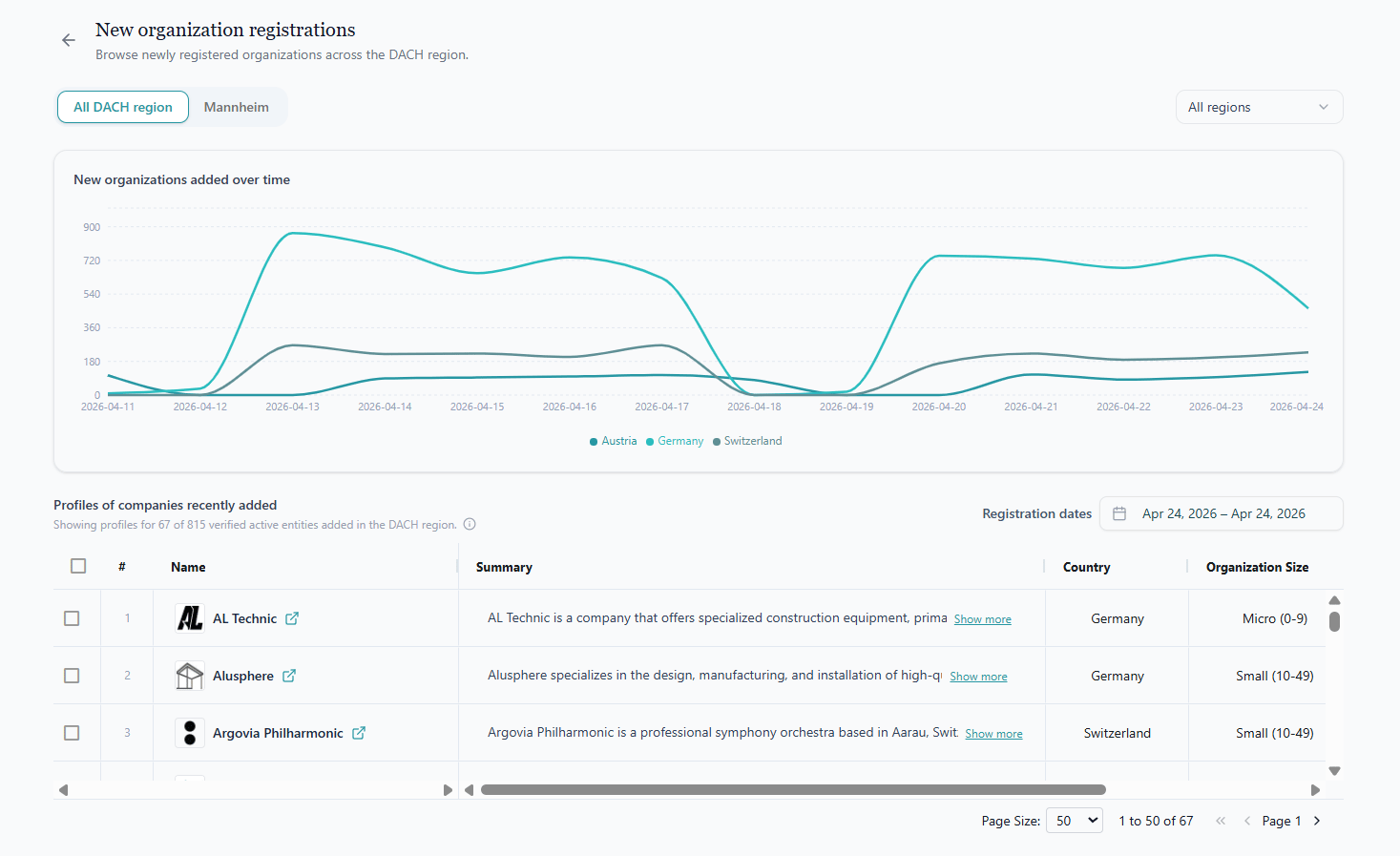
The **New organizations** page (also called *New organization registrations*) gives you a continuously updated view of organizations that have just appeared in public registers across the DACH region, **Germany**, **Austria**, and **Switzerland**. It's the fastest way to spot market entrants, new competitors, or fresh prospects right after they're formed.
To open it, click the **"X new companies recently added in the DACH region"** pill that sits above the search panel on the home page.
 ## Filters
Three controls at the top of the page shape the data you see:
* **Region scope (left):** Toggle between **All DACH region** and any specific office/region you have access to. The scope you pick drives both the chart and the table below.
* **Country multi-select (right):** Narrow the view to Germany, Austria, Switzerland, or any combination of them. Defaults to all three.
* **Registration dates (above the table):** A calendar range picker that limits the table to organizations whose *registration date* falls within the chosen window. By default, the table opens on the latest available date so you immediately see what's brand new. Click **Reset to latest** to jump back to today after exploring an earlier window.
## New organizations added over time
The line chart plots how many new organizations have been registered each day, with a separate line per country (Germany, Austria, Switzerland). Hover over any point to see the exact count for that day.
Use this chart to:
* Spot registration trends or anomalies.
* Compare activity across countries.
* Pick a day or period worth drilling into with the table below.
## Profiles of organizations recently added
Below the chart, a paginated table shows the actual newly registered organizations. The summary line above the table (for example, *"Showing profiles for 72 of 863 verified active entities added in the DACH region"*) indicates:
* **Total processed**: organizations detected in the register for the selected scope and date range.
* **Profiles built**: of those, how many have a verified active web domain so we can show a full profile.
**Why the numbers differ.** Not every registered organization gets a profile immediately. Some entities don't yet have a detectable domain. We periodically recheck and update these records as more domains become available.
Typical columns include **Name**, **Domain**, **Summary**, **Country**, **Organization Size**, **Organization Type**, **NACE code**, **Registration date**, **Register court**, and **Address**. Click a row to open the organization's [full profile](/goi/search-results#company-profile), just like in regular search results. You can rearrange columns, hide duplicates, and use the standard table tools from there.
## Filters
Three controls at the top of the page shape the data you see:
* **Region scope (left):** Toggle between **All DACH region** and any specific office/region you have access to. The scope you pick drives both the chart and the table below.
* **Country multi-select (right):** Narrow the view to Germany, Austria, Switzerland, or any combination of them. Defaults to all three.
* **Registration dates (above the table):** A calendar range picker that limits the table to organizations whose *registration date* falls within the chosen window. By default, the table opens on the latest available date so you immediately see what's brand new. Click **Reset to latest** to jump back to today after exploring an earlier window.
## New organizations added over time
The line chart plots how many new organizations have been registered each day, with a separate line per country (Germany, Austria, Switzerland). Hover over any point to see the exact count for that day.
Use this chart to:
* Spot registration trends or anomalies.
* Compare activity across countries.
* Pick a day or period worth drilling into with the table below.
## Profiles of organizations recently added
Below the chart, a paginated table shows the actual newly registered organizations. The summary line above the table (for example, *"Showing profiles for 72 of 863 verified active entities added in the DACH region"*) indicates:
* **Total processed**: organizations detected in the register for the selected scope and date range.
* **Profiles built**: of those, how many have a verified active web domain so we can show a full profile.
**Why the numbers differ.** Not every registered organization gets a profile immediately. Some entities don't yet have a detectable domain. We periodically recheck and update these records as more domains become available.
Typical columns include **Name**, **Domain**, **Summary**, **Country**, **Organization Size**, **Organization Type**, **NACE code**, **Registration date**, **Register court**, and **Address**. Click a row to open the organization's [full profile](/goi/search-results#company-profile), just like in regular search results. You can rearrange columns, hide duplicates, and use the standard table tools from there.