> ## Documentation Index
> Fetch the complete documentation index at: https://docs.istari.ai/llms.txt
> Use this file to discover all available pages before exploring further.
# Organizational filters
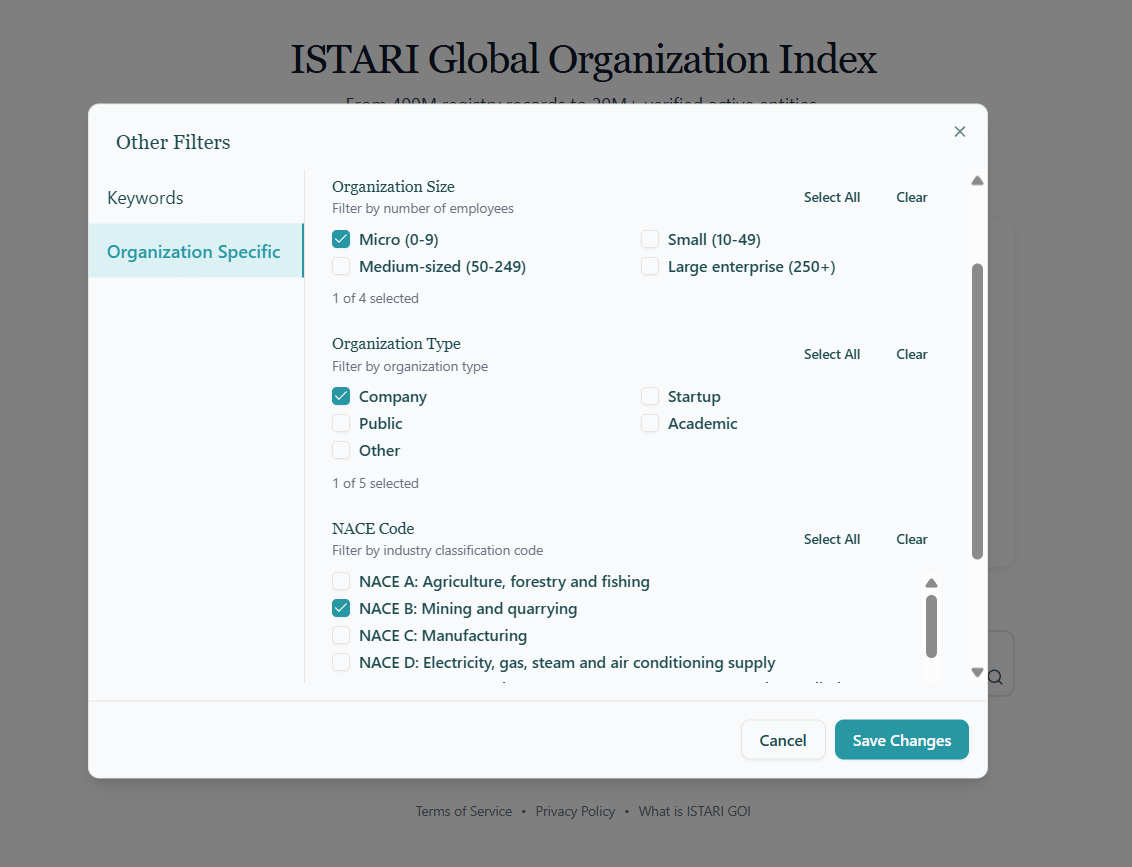
These filters help you control **who** appears in your results, based on structural attributes of an organization. They live under the **Other Filters** button on the search bar, on the **Organization Specific** tab.
* **Organization Size:** Filter by number of employees, using EU SME definitions:
* Micro (0–9 employees)
* Small (10–49)
* Medium-sized (50–249)
* Large enterprise (250+)
* **Organization Type:** Narrow results to **Company**, **Startup**, **Public**, **Academic**, or **Other**.
* **NACE Code:** The EU's statistical classification of economic activities. Pick one or more sectors (NACE A – NACE U) to restrict results to specific industries. [Learn more about NACE](https://ec.europa.eu/eurostat/web/nace).
Selections within a single filter are combined with **OR** (e.g. pick Micro *and* Small to see both). Selections across filters are combined with **AND** (e.g. Micro + NACE C returns small manufacturers only). Use the **Clear** link next to any filter to reset it, or **Clear All** at the top to reset every Organization Specific filter at once.